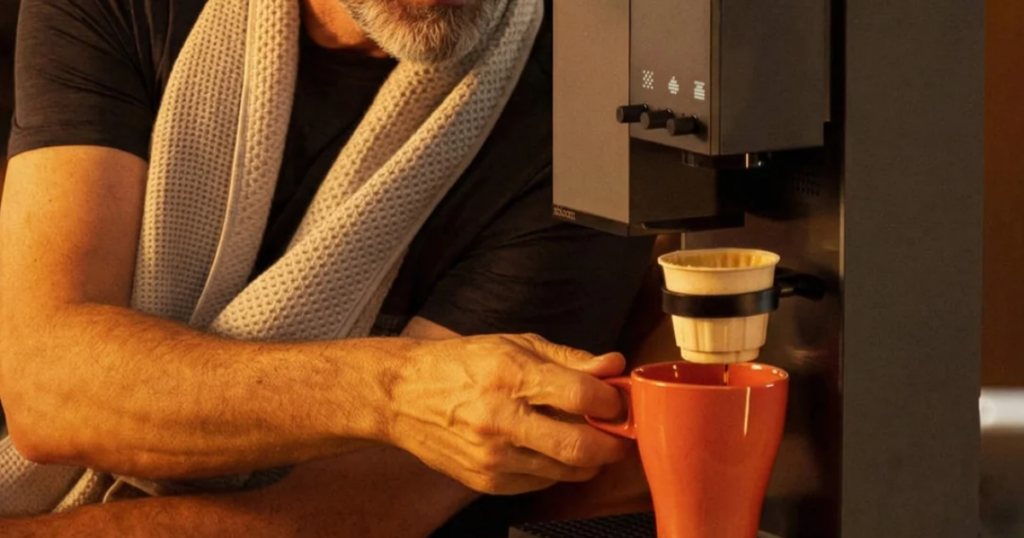

A good pour-over takes a burr grinder, a scale, a kettle that holds its temperature and a steady hand. The xBloom Studio puts all four into one 5.1 kg machine and makes one cup at a time. Whether that trade suits you depends mostly on how many people in your house want coffee at 7 a.m.
This xBloom Studio review is built from the Amazon listing for ASIN B0DKKLY1V9, xBloom’s own product and xPod pages, Seattle Coffee Gear’s US retail listing, and figures published by Coffeegeek, Coffeeness and Whole Latte Love, who have had the machine in hand. We have not brewed on it, so it carries no score. See how we work.
Why you can trust us. Tools Soko earns a commission when you buy through links on this page. It never changes what we recommend, and it never changes the price you pay. As an Amazon Associate we earn from qualifying purchases.
The short version
- The grinder is the real thing. 48 mm steel conical burrs, 80 settings and adjustable speed, which is more than most standalone home grinders offer.
- One cup per cycle. A household that wants a pot should buy a batch brewer.
- xPods cost about $1.75 each at xBloom’s regular bundle price, but two of the three modes run on any beans you like.
- The US unit is 120 V only. Anyone on 220–240 V mains needs a regional model.
- Two years on the machine, one on the parts. xBloom’s warranty excludes burr wear and scale build-up, so descaling is your job.
Pour-over coffee is not difficult. It is fiddly, which is worse, because fiddly is the thing you stop doing on a Tuesday.
The manual routine goes weigh, grind, heat, rinse the filter, bloom, then pour in stages while watching a scale climb. Get it right and the reward is having to do exactly the same thing tomorrow, which is where most people’s consistency falls apart. The Studio’s pitch is that it remembers the recipe and repeats it. The question this review answers is whether that is worth $549 to $599 to you, the range it sat in when we checked on 17 September 2026.
xBloom Studio specifications
| Brand / model | xBloom Studio |
| Amazon ASIN | B0DKKLY1V9 |
| Brewing modes | Autopilot, Copilot, Free Solo |
| Grinder | 48 mm stainless steel conical burrs |
| Grind settings | 80, at 18.75 microns per step |
| Grinder speed | 60–120 RPM, in 10 RPM steps |
| Grind retention | Under 0.3 g |
| Scale | 0.1 g accuracy to 1,000 g; 1 g accuracy to 2,000 g |
| Water temperature | 40–95 °C (104–203 °F) in app recipes |
| Flow rate | 3–3.5 ml per second |
| Pour patterns | Centre, circle, spiral |
| Reservoir | 946 ml (32 fl oz); one source gives 1.0 L |
| Brew size | Up to 355 ml (12 fl oz) per cycle |
| Water supply | Reservoir, or plumbed to a water line |
| Power | 1,400 W, 120 V, 12 A (US unit) |
| Connectivity | Bluetooth 5.0; iOS and Android app |
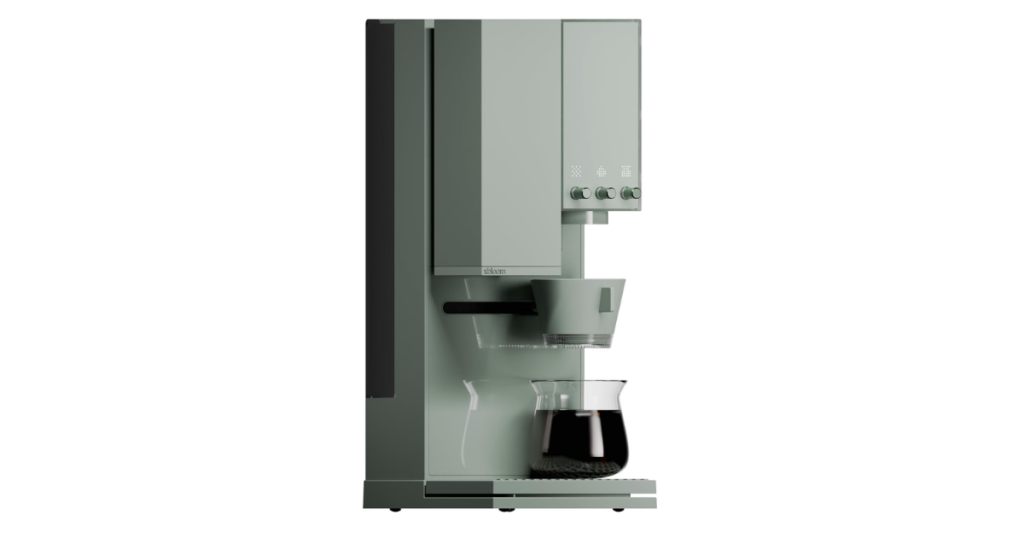
| Dimensions | 42.7 × 20.3 × 17.0 cm (16.8 × 8.0 × 6.7 in), height first |
| Weight | 5.1 kg (11.3 lb) |
| Warranty | 2 years on the main unit, 1 year on removable parts (Australia: 1 year) |
| Price | $599 list; $549 at Seattle Coffee Gear, both checked 17 September 2026 |
In the box, per the listing: the Studio, an Omni Dripper 2 with Hyperflow Bottom, 10 paper filters, the xPod Dock, a magnetic dosing cup, a default recipe card, a quick start guide, a cleaning brush and a power cord.
Where the sources disagree
Four figures differ between sources. None of them changes the verdict on its own, but we are not going to pick one silently.
- Reservoir. Coffeegeek and Whole Latte Love give 946 ml (32 oz). Coffeeness gives 1.0 L. A 54 ml gap is almost certainly rounding.
- Brew size. Coffeeness gives 12 fl oz per cycle. Another published summary gives 8 to 11 oz, which may describe a typical cup rather than the ceiling.
- Warranty. Seattle Coffee Gear lists one year or 2,000 brews. The Amazon listing and xBloom’s own warranty policy both give two years on the machine, and the policy sets no brew limit. We treat the manufacturer’s policy as the one that counts, and set out its terms below.
- Price. $599 list, $549 at Seattle Coffee Gear, both checked 17 September 2026. Amazon prices independently of both.
Two things we could not find published anywhere: what the Omni Dripper 2’s Hyperflow Bottom changes about the flow, and how often the machine needs descaling. The second matters more than it sounds, for a warranty reason covered below.
A grinder that would stand on its own
Most coffee machines with a grinder built in treat it as a line on the box. The figures here describe something closer to a serious standalone single-dose grinder.
48 mm conical steel burrs are a normal size for a good home grinder. The more telling number is the step. Whole Latte Love and Coffeegeek both give 18.75 microns per setting, and across 80 settings that is roughly 1.5 mm of travel from finest to coarsest. That covers espresso-fine to cold-brew coarse, in clicks small enough to nudge a pour-over recipe by a repeatable amount rather than a jump.
Burr speed is adjustable from 60 to 120 RPM, which is unusual at any price. Slower burrs run cooler and are often said to produce fewer fines. We cannot tell you how much that shows in the cup on this machine. We can tell you it is a setting most grinders do not expose at all.
Published retention is under 0.3 g, or under 2% of a 15 g dose. That mostly matters when you switch beans, because the first cup from a new bag carries a trace of the old one.
There is no hopper. You weigh out beans for every cup, which is either the point or a nuisance, depending on who you are.
The scale is what makes a recipe repeatable
Pour-over is controlled by water weight, not by time. A machine that knows how many grams have landed can stop at the right point whether the coffee bed drains fast or slow, and that is the difference between a recipe and a guess.
Whole Latte Love gives the scale as accurate to 0.1 g up to 1,000 g and to 1 g up to 2,000 g. So it doubles as a kitchen scale for anything that fits on the drip tray.
Knobs, not a touchscreen
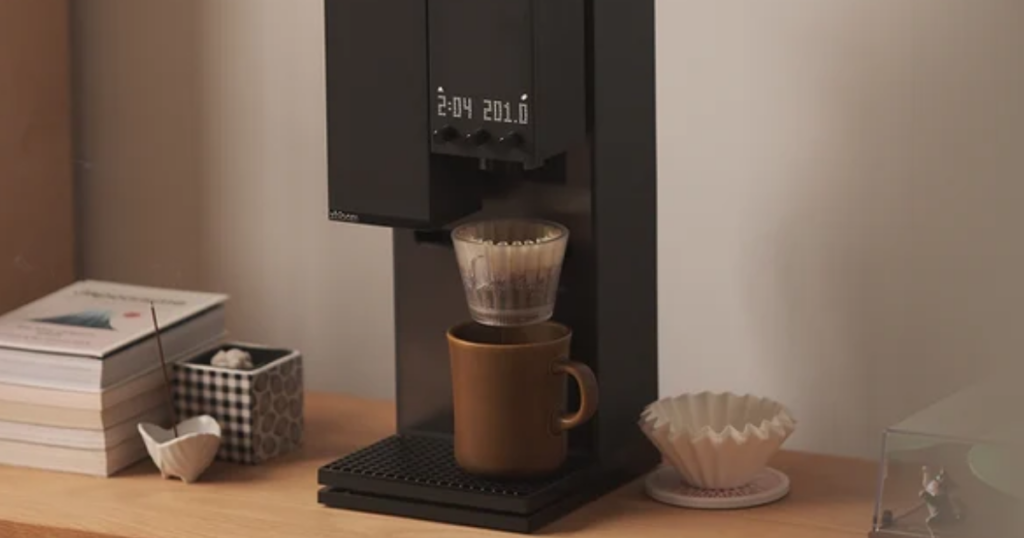
Grind size, water temperature and flow rate each sit on a physical knob, with an LED matrix display above. In Free Solo mode you can turn them while the brew is running.
That matters beyond how it feels. A machine you can run without its app still works when an update goes badly, the phone is in another room, or the company changes its software plans. Coffeegeek reports the app has had bugs and some regressions, and that a few advanced settings live only in the app. The knobs are the insurance.
The cost is a learning curve, which Coffeeness describes as steep. Three knobs that each behave differently across three modes is a lot to hold in your head for the first week.
A temperature ceiling light-roast drinkers should know about
App recipes accept 40 to 95 °C (104 to 203 °F), per Whole Latte Love. For medium and darker roasts, the top of that range is comfortably hot enough.
The detail worth knowing is what reaches the coffee. Whole Latte Love measured 201 °F (about 94 °C) at the spout with the machine set to 203 °F. Very light roasts are often brewed at or near boiling, and for those drinkers this is a ceiling to know about before buying. It is not a defect. It is a limit.
Three pour patterns and a moving spout
The brewer pours in the centre, in a circle or in a spiral, at a published 3 to 3.5 ml per second, and the listing says flow rate can be adjusted in real time.
This is the part that stands in for a gooseneck kettle and a practised wrist. A centre pour digs into the coffee bed, a spiral wets it evenly, and a circle sits between the two. Having all three repeatable to the gram is the real reason a pour-over enthusiast would look at this machine instead of a better kettle.
What xPods cost, and where they run out
xPods are what Autopilot runs on. According to xBloom, each one holds 15 g of whole beans inside a biodegradable dripper and comes with a recipe card. You tap the card on the machine, tip the beans into the grinder, sit the pod in the xPod Dock and press start.
The listing’s promise of no capsules and no extra paper filters is accurate in a narrow sense: the beans are whole, and the pod is its own filter. It is still a single-use, proprietary consumable, and three things are worth being clear about.
Cost. xBloom’s own Pick bundle lists 32 xPods at $56, which is $1.75 a pod. It was on sale at $40, or $1.25 a pod, when we checked on 17 September 2026. At two cups a day, $1.75 a pod comes to roughly $1,280 a year. Beans bought by the bag and ground in Copilot or Free Solo mode will usually cost a good deal less per cup.
Availability. Coffeegeek, reviewing from Europe, reported that xPods were not yet sold there. If xBloom does not ship pods to your country, Autopilot is a mode you do not have.
Lock-in. Coffeegeek also reports that you cannot program your own recipe chips. The pod-and-card route is xBloom’s, not yours.
None of that sinks the machine, because the other two modes take any beans you buy. It does mean the most beginner-friendly mode is the one with an ongoing bill and a supply chain attached.
Who it suits
One or two people who drink filter coffee and care how it tastes. Repeatability, fine grind control and recipe memory pay off most for someone who buys specialty beans, rotates between them, and would otherwise be weighing and pouring by hand.
Someone starting from nothing. If you do not yet own a good burr grinder, a 0.1 g scale and a temperature-controlled kettle, the Studio replaces all three purchases in one footprint on the counter.
The pour-over hobbyist who wants to experiment without the labour. Free Solo exposes grind size, burr speed, temperature, flow rate and pour pattern. Saving a recipe that worked and running it again next week is the feature, and the app lets you share recipes with other owners and use theirs.
Who should buy something else
Households that need several cups at once. Every cup is its own cycle, with its own dose, grind, brew and dripper to rinse. Four people wanting coffee before work means four brews back to back. A batch brewer makes a full carafe in one go, and for that household it is simply the better tool.
Anyone who wants a one-button morning. Even Autopilot asks you to pour beans into the grinder, and the other two modes ask you to weigh them first.
Espresso and milk-drink people. The grinder reaches espresso fineness. The machine does not make espresso.
Very light roast specialists, for the spout temperature reason above.
Offices. One cup per cycle is slow for a queue, and xBloom’s warranty excludes commercial use.
Anyone on 220–240 V mains buying the US listing. This is the most expensive mistake available here, so it gets its own section.
Check the voltage before anything else
The US unit is rated at 1,400 W, 120 V and 12 A. The Amazon listing mentions a universal power cord, but that describes the cord, not the machine’s electrical rating.
A 120 V heating appliance plugged into 230 V mains will be damaged. At 1,400 W, a step-down transformer big enough to run it safely is heavy, costly and impractical on a kitchen counter. The Studio is sold and reviewed in Europe, so regional versions exist. In the UK, Europe, Africa, Australia or most of Asia, buy the model sold for your market from a seller in your market, and read the rating plate before you open the box.
In North America the concern is smaller but real. Twelve amps on a standard 15 A kitchen circuit leaves little headroom for a kettle or toaster running on the same circuit at the same time.
Two years on the machine, one year on the parts
xBloom’s warranty policy gives the Studio a two-year limited warranty on the main unit in the US, Canada, the EU and the UK, and one year in Australia. In the US and Canada it runs from the date of purchase or the date of delivery, whichever is later. The policy sets no brew limit, so the one-year-or-2,000-brews term on Seattle Coffee Gear’s listing does not match xBloom’s current terms.
| Part or situation | Cover |
|---|---|
| Main unit | 2 years (US, Canada, EU, UK); 1 year (Australia) |
| Removable parts: water tank, drip tray, dosing cup, Omni Dripper, brewers | 1 year |
| Commercial or rental use | Not covered |
| Normal wear, including grinder burrs and scale build-up | Not covered |
| Cosmetic damage, non-xBloom parts, unauthorised repairs | Not covered |
Two rows in that table change how you own the machine. Scale build-up is excluded, so a heater that fails from scale is your bill rather than xBloom’s, and descaling on schedule is part of the deal. And cover depends on where you bought it, so check that an Amazon or marketplace seller is xBloom or an authorised retailer before you pay.
If it turns out not to suit you
Buying direct from xBloom comes with a money-back window: 30 days from delivery in the US and Canada, 14 days in the EU, UK and Australia. Read it as a window for a machine you have barely used. Returns must be complete and in the original packaging, xBloom charges up to $60 in the US and Canada, or 10 to 20% of the price elsewhere, if the machine comes back dirty, wet or short of parts, and return shipping is yours unless the machine is faulty.
Smaller things worth checking
Ten filters is ten cups
The box holds 10 paper filters. xBloom says the Omni Dripper 2 takes its own flat-bottom filters or any 155 mm filter paper, and it sells the flat-bottom ones at $10 for 100, which is 10 cents a cup. Amazon also sells a Studio bundle that includes 100 filters. Order replacements with the machine rather than after the tenth cup.
Cabinet clearance
At 42.7 cm (16.8 in) tall it will slide under many wall cabinets. You also need room to load beans into the grinder and reach the reservoir, so measure the space you will work in, not only the space it will sit in. The footprint, 20.3 by 17.0 cm, is small for what it replaces.
Refills, or plumb it in
At a common 1:16 coffee-to-water ratio, a 946 ml reservoir covers about four 15 g brews, or three at 18 g. That is our arithmetic, not a published figure. For one person it is a refill every couple of days; for a family it is every morning. Coffeegeek and Whole Latte Love both note the machine can be plumbed to a water line. No plumbing kit is listed in the box, and we could not find what the connection requires.
Cleaning
A single-dose grinder with low retention is easier to keep clean than a hopper grinder, and a brush comes in the box. xBloom lists the Omni Dripper 2 as hand wash only, so it is a rinse at the sink after every cup.
We could not find a published descaling interval, and that gap matters because xBloom’s warranty excludes scale build-up. Anything that heats water builds scale, faster in hard-water areas. Use filtered water, descale regularly, and ask xBloom support for an interval that suits your water.
Tea is a separate purchase
xBloom’s product page now describes a fourth mode, Teapilot. This listing names three modes, and its box contents include no tea brewer. Amazon sells the tea brewer in a separate Studio bundle, so buy that one if tea is part of the plan.
How it compares
Against the original xBloom. Coffeeness reports 80 grind settings on the Studio against 30 on the original, and Whole Latte Love gives the reservoir as 32 oz against 23.7 oz. Coffeeness also describes the Studio as cheaper than the original and less tied to pods. On every point we could compare, the published figures favour the Studio.
Against a separate grinder, scale, kettle and dripper. We have not priced an equivalent kit and will not guess at a number. The structural trade is clear enough. Separate pieces can be upgraded, repaired or replaced one at a time, and a failed kettle does not take the grinder with it. The Studio gives you repeatability, a small footprint and recipe memory, but everything lives in one housing, so when something fails the whole machine goes in for repair.
Against a batch drip brewer. A different job. A batch brewer serves a household; the Studio serves one cup precisely. If more than two people drink coffee at the same time in your home, the batch brewer is the right comparison and usually the right answer.
Tools Soko verdict
No score, because we have not brewed on it. What the published figures support is this: the Studio has a genuinely capable single-dose grinder, a scale accurate enough to control a recipe, and a pour mechanism that repeats what a practised hand does with a kettle. Together they solve the actual problem with pour-over, which is doing it the same way twice.
The limits are just as specific. One cup per cycle. A spout temperature that tops out around 94 °C. A pod mode that costs money every morning and is not sold everywhere. An app with a record of bugs. And a warranty that leaves scale build-up and burr wear to you.
Worth serious consideration for one or two filter-coffee drinkers who would otherwise buy a grinder, scale and kettle separately. The wrong machine for a family that wants a pot, for anyone who wants espresso, and for anyone about to bring a 120 V unit into a 230 V home.
Before you check out: confirm the voltage and colour on the listing in front of you, and check that the seller is xBloom or an authorised retailer, because that is what the warranty covers.
Frequently asked questions
Do I need xPods to use the xBloom Studio?
No. xPods only drive Autopilot mode. Copilot and Free Solo both work with any whole beans you buy, ground in the built-in grinder.
How much do xPods cost?
xBloom’s Pick bundle lists 32 xPods at $56, which works out to $1.75 a pod, and it was discounted to $40 when we checked. Each pod holds 15 g of whole beans. Prices vary by coffee and promotion, so check xBloom’s shop for the one you want.
Can the xBloom Studio make espresso?
No. The grinder reaches espresso fineness, but the machine is a pour-over filter brewer and does not generate the pressure espresso needs.
How many cups can it make at once?
One. Each brew is a separate cycle with its own dose and its own dripper. Published figures put a single brew at up to 12 fl oz (355 ml), though one source gives 8 to 11 oz.
Does it work without the app?
Yes, for brewing. The knobs and LED display control grind size, temperature and flow rate directly. Creating, saving and sharing recipes happens in the app, and Coffeegeek reports a few advanced settings are app-only.
Will the US model work on 230 V power?
Do not try it. The US unit is rated at 120 V, and a transformer big enough for a 1,400 W heater is impractical. Buy the version sold for your country and check the rating plate on the machine.
How long is the xBloom Studio warranty?
Two years on the main unit in the US, Canada, the EU and the UK, and one year in Australia, per xBloom’s warranty policy. Removable parts such as the water tank, drip tray and Omni Dripper get one year. The policy excludes commercial use, burr wear and scale build-up, and covers machines bought from xBloom or an authorised retailer.
How hot does the water get?
App recipes go up to 203 °F (95 °C). Whole Latte Love measured 201 °F (about 94 °C) at the spout on that setting, which is hot enough for most coffees and slightly low for the very lightest roasts.
What filters does the xBloom Studio use?
The Omni Dripper 2 takes xBloom’s own flat-bottom filters or any 155 mm filter paper. xBloom sells its filters at $10 for 100, and the box includes 10 to start with.
More household reviews are in Home & Fixtures, and app-connected kit is in Gadgets & Tech. For how we build a review without a bench test, see how we work.